mirror of
https://github.com/luckyyzh/pi-agent-integrated.git
synced 2026-10-03 11:09:34 +00:00

153 lines
6.8 KiB
Markdown
153 lines
6.8 KiB
Markdown
# Pi Web
|
|
|
|
[中文文档](./README.zh-CN.md) | [日本語](./README.ja.md)
|
|
|
|
Local web UI for the [pi coding agent](https://github.com/badlogic/pi-mono). Pi Web reads your local pi session files and gives you a browser workspace for session browsing, real-time chat, model configuration, skill management, and project file preview.
|
|
|
|
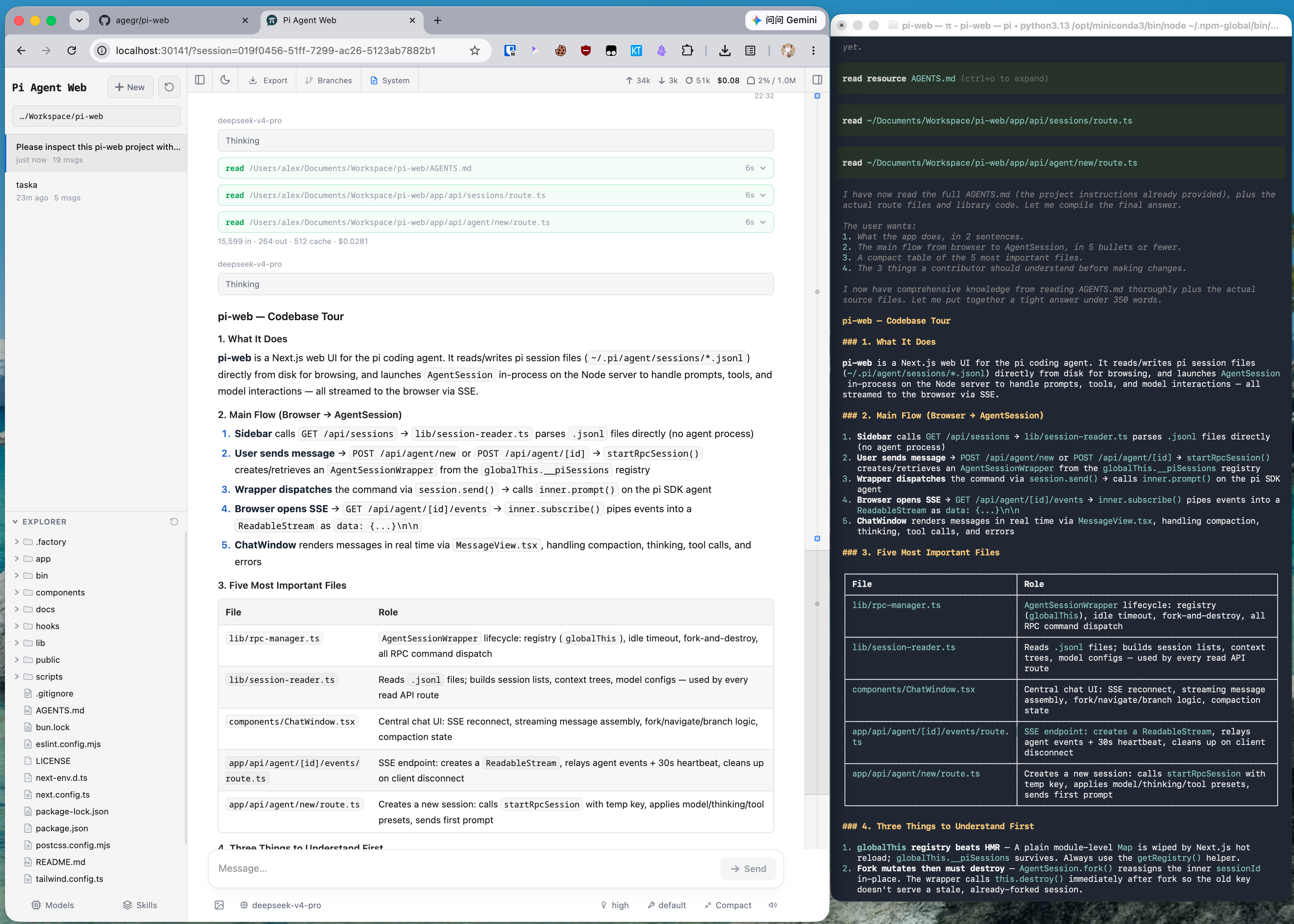
|
|
|
|
The same pi session in CLI and Pi Web: structured tool calls, readable Markdown, session browsing, and cleaner results.
|
|
|
|
## Quick Start
|
|
|
|
Pi Web requires Node.js 22.19.0 or newer. Check your version with `node --version`.
|
|
|
|
**Run without installing:**
|
|
|
|
```bash
|
|
npx @agegr/pi-web@latest
|
|
```
|
|
|
|
**Or install globally:**
|
|
|
|
```bash
|
|
npm install -g @agegr/pi-web
|
|
pi-web
|
|
```
|
|
|
|
Then open [http://127.0.0.1:30141](http://127.0.0.1:30141). The CLI will try to open the browser automatically after the server is ready. Pi Web listens on `127.0.0.1` by default.
|
|
|
|
**Options:**
|
|
|
|
```bash
|
|
pi-web --port 8080 # custom port
|
|
pi-web --hostname 0.0.0.0 # expose on a trusted network
|
|
pi-web -p 8080 -H 0.0.0.0 # combine options
|
|
pi-web --no-open # do not open the browser automatically
|
|
|
|
PORT=8080 pi-web # environment variable is also supported
|
|
PI_WEB_HOSTNAME=0.0.0.0 pi-web # explicit network exposure
|
|
PI_WEB_ALLOWED_HOSTS=pi-web.internal pi-web # allow an exact proxy/custom hostname
|
|
PI_WEB_NO_OPEN=1 pi-web # useful when running as a background service
|
|
```
|
|
|
|
Pi Web has no application-level authentication and can invoke a high-privilege agent. Do not expose it to the internet; only use non-loopback bindings on a trusted network.
|
|
API requests accept loopback names, IP literals, the selected bind hostname, and exact comma-separated names in `PI_WEB_ALLOWED_HOSTS`. Configure that variable when a trusted reverse proxy uses a different external hostname.
|
|
|
|
## HTTP Proxy
|
|
|
|
Pi Web reads the standard `HTTP_PROXY`, `HTTPS_PROXY`, and `NO_PROXY` environment variables for server-side model and API requests.
|
|
|
|
On macOS or Linux:
|
|
|
|
```bash
|
|
HTTP_PROXY=http://127.0.0.1:7890 \
|
|
HTTPS_PROXY=http://127.0.0.1:7890 \
|
|
NO_PROXY=localhost,127.0.0.1 \
|
|
npx @agegr/pi-web@latest
|
|
```
|
|
|
|
On Windows PowerShell:
|
|
|
|
```powershell
|
|
$env:HTTP_PROXY = "http://127.0.0.1:7890"
|
|
$env:HTTPS_PROXY = "http://127.0.0.1:7890"
|
|
$env:NO_PROXY = "localhost,127.0.0.1"
|
|
npx @agegr/pi-web@latest
|
|
```
|
|
|
|
## Features
|
|
|
|
- **Pick work back up**: browse previous pi conversations by project without digging through terminal history or session paths.
|
|
- **Try different directions safely**: continue from an earlier message or fork a session into a separate route.
|
|
- **Work across branches**: switch Git worktrees from the sidebar so new sessions and the Explorer follow the checkout you choose.
|
|
- **Chat beside the project**: browse files on the left and preview source, docs, images, audio, and PDFs on the right while the agent works.
|
|
- **See session state clearly**: context usage, cost, compaction state, and system prompt details are visible from the top bar.
|
|
- **Configure less from the terminal**: manage models, login/API keys, model tests, and skill switches from the web UI.
|
|
- **Use the interface in your language**: switch between the supported UI languages from the top bar.
|
|
|
|
## Notes
|
|
|
|
- **Data directory**: Pi Web reads `~/.pi/agent/sessions` by default. Set `PI_CODING_AGENT_DIR` to point at another pi agent directory.
|
|
- **Session files**: files are stored as `~/.pi/agent/sessions/<encoded-cwd>/<timestamp>_<uuid>.jsonl`.
|
|
- **Model config**: the Models panel reads and writes `models.json` in the pi agent directory. Model lists and defaults come from pi's config.
|
|
- **File access**: file browsing and preview are scoped to the selected project directory and working directories that appear in sessions.
|
|
- **Git worktrees**: see [Worktrees in Pi Web](./docs/worktrees.md) for when the switcher appears, how new worktrees are created, and what removal does.
|
|
- **Forks vs in-session branches**: Fork creates a new `.jsonl` file. "Edit from here" creates another branch inside the same session file.
|
|
- **Internationalization**: see [Internationalization](./docs/i18n.md) for using translations and adding languages or UI text.
|
|
|
|
## Development
|
|
|
|
```bash
|
|
npm install
|
|
npm run dev
|
|
```
|
|
|
|
The local dev server runs at [http://127.0.0.1:30141](http://127.0.0.1:30141).
|
|
|
|
Common checks:
|
|
|
|
```bash
|
|
node_modules/.bin/tsc --noEmit
|
|
npm run lint
|
|
```
|
|
|
|
Avoid running `next build` / `npm run build` during local development. It writes to `.next/` and can interfere with the dev server; leave builds for release work.
|
|
|
|
## Project Structure
|
|
|
|
```text
|
|
app/
|
|
api/
|
|
agent/ # creates/drives AgentSession and exposes SSE events
|
|
auth/ # OAuth and API key management
|
|
cwd/browse/ # browsable server directory listing
|
|
cwd/validate/ # custom working directory validation
|
|
default-cwd/ # pi default working directory lookup
|
|
files/ # file listing, reading, preview, and watching
|
|
home/ # current user home directory
|
|
models/ # available models, default model, thinking levels
|
|
models-config/ # read/write models.json and test models
|
|
sessions/ # session reads, rename, delete, context, HTML export
|
|
skills/ # skill listing, search, install, enable/disable
|
|
components/
|
|
AppShell.tsx # main layout, URL state, top panels, file tabs
|
|
SessionSidebar.tsx # project selector, session tree, Explorer
|
|
DirectoryPicker.tsx # browsable and editable working-directory picker
|
|
ChatWindow.tsx # messages, SSE, image drag/drop, minimap
|
|
ChatInput.tsx # input bar, model/tools/thinking/compact/slash controls
|
|
MessageView.tsx # message, thinking, tool call/result rendering
|
|
ModelsConfig.tsx # model and auth configuration panel
|
|
SkillsConfig.tsx # skill management panel
|
|
FileExplorer.tsx # file tree
|
|
FileViewer.tsx # source, diff, image, audio, PDF, DOCX preview
|
|
lib/
|
|
directory-browser.ts # directory normalization and safe listing helpers
|
|
http-dispatcher.ts # HTTP(S) proxy setup for server-side fetch
|
|
rpc-manager.ts # AgentSessionWrapper lifecycle and global registry
|
|
session-reader.ts # parses .jsonl session files and branch contexts
|
|
normalize.ts # normalizes toolCall field names
|
|
file-access.ts # file read safety boundary
|
|
file-paths.ts # path encoding and relative path helpers
|
|
markdown.ts # Markdown/Mermaid/KaTeX plugin configuration
|
|
pi-types.ts # pi-related types
|
|
hooks/
|
|
useAgentSession.ts # session loading, command sending, SSE state machine
|
|
useAudio.ts # completion sound
|
|
useDragDrop.ts # image drag/drop
|
|
useTheme.ts # theme switching
|
|
bin/
|
|
pi-web.js # npm CLI entrypoint
|
|
instrumentation.ts # initializes the server HTTP dispatcher
|
|
```
|